PayPal Casino Troubleshooting Guide: Fixing Common PayPal Issues 2026

Using PayPal at online casinos is usually smooth, but like any digital payment system, it can run into issues. Whether you’re dealing with a PayPal deposit that won't work, a declined PayPal transaction, or issues with security codes, this guide covers common problems UK players face and how to fix them.
This page covers real-world troubleshooting steps to keep your PayPal casino experience secure and reliable.
Why Troubleshooting PayPal at Casinos Matters
PayPal is an encrypted payment system that protects your financial details, but casino integrations involve multiple layers—the casino’s cashier, PayPal’s systems, and your account settings. When something goes wrong, it can be unclear where the issue starts.
The most common PayPal payment challenges include:
- Declined transactions
- Missing security codes
- Verification holds
- Account restrictions
Below are practical steps to help you identify and fix these issues.
PayPal Deposit Not Working — What to Check First:
If your PayPal deposit at a casino isn’t working, try this checklist:
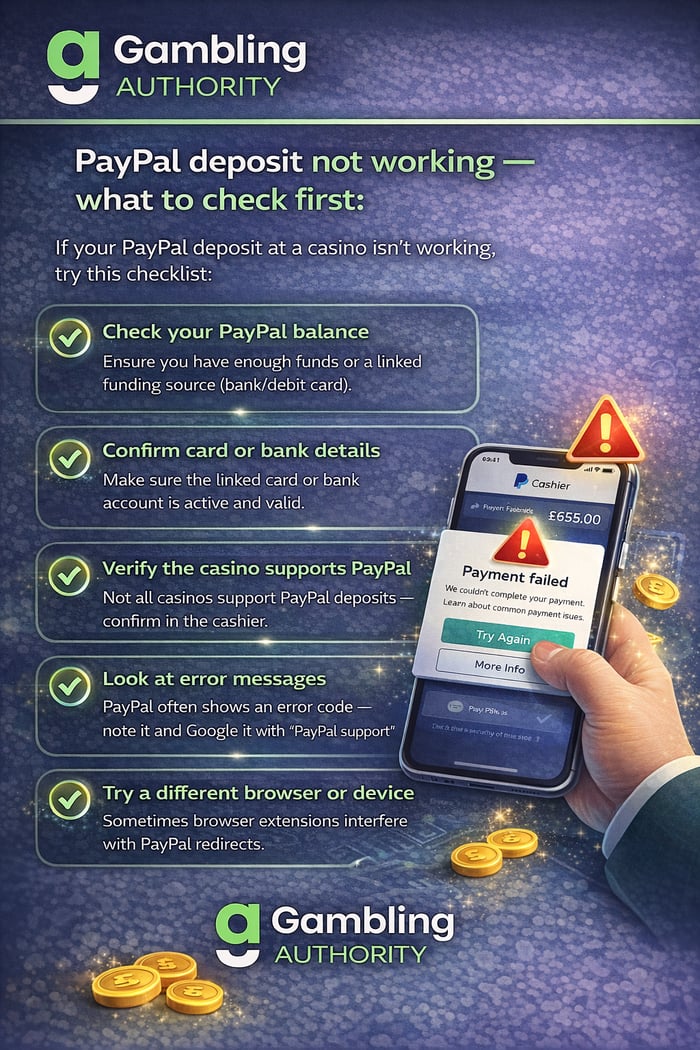
If none of these work, log out of both the casino and PayPal, then log back in before retrying.
PayPal Transaction Declined — Common Reasons
A PayPal transaction decline can occur for several reasons:
- PayPal security blocks: Large or unusual payments can trigger fraud filters.
- Insufficient funds: Even if you have a linked card, your PayPal balance may be low.
- Casino or country restrictions: Some operators or regions block certain payment methods.
- Payment method mismatch: Ensure you’re not using PayPal Credit for gambling — this is prohibited in the UK.
What to do next:
- Check your PayPal notifications for security alerts
- Switch to another linked funding source
- Contact PayPal support with the transaction ID
Declines are not always permanent — often they are temporary protective blocks.
PayPal Not Sending Security Code
Sometimes PayPal won’t send a security code text or authentication prompt:
Why this happens
- Your phone number may be outdated
- SMS messages may be blocked by carrier filters
- Temporary network or PayPal service issues
How to fix it
- Update your mobile number in PayPal settings
- Check signal strength or Wi-Fi-to-SMS conflicts
- Try the PayPal app for in-app approval instead of SMS
- Contact PayPal support if codes are still not arriving
Do not repeatedly request codes too quickly — that can trigger a temporary block.
Forgotten PayPal Security Questions or Login Issues
If you can’t remember PayPal login details or security questions:
Steps to resolve
- Use the “Forgot password?” link
- Verify your identity with email or mobile
- Reset security questions if prompted
- Update recovery email and phone number
Keep recovery options up to date to prevent lockouts when making casino payments.
PayPal Account Limitations Affecting Casino Transactions
PayPal may limit your account due to:
- Unusual payment patterns
- Newly linked cards
- Security concerns
- Large transactions
When limited:
- Log in to see the limitation details
- Submit any requested documents (ID verification, proof of address)
- Follow PayPal’s instructions closely
Limitations are typically lifted once verification is complete.
When None of These Fixes Work
If you still face issues:
- Contact the casino’s support team with screenshots
- Reach out to PayPal support with transaction IDs and timestamps
- Avoid multiple rapid payment attempts (this can worsen blocks)
Continuously declining payments can sometimes indicate a misconfigured casino cashier or an account mismatch.
Fixes for Common PayPal Casino Issues
- Issue Typical Cause Quick Fix
- PayPal deposit not working. Balance or link issues: Check balance, update cards, re-login
- PayPal transaction declined. Security block: Check alerts, try app approval
- No security code sent. Phone/SMS issue: Update number, use the PayPal app
- Account limitations: Verification needed. Submit documents
- Login problems, forgotten credentials: use recovery tools
Most PayPal casino issues are resolved with a few simple steps — and understanding why they occur improves confidence and reduces frustration.
PayPal Casino Troubleshooting FAQs
It may be due to insufficient funds, incorrect linked cards, or casino cashier restrictions.
Check your PayPal alerts, try a different funding source, and contact support with the transaction ID.
Ensure your phone number is correct and try PayPal app authentication instead of SMS.
Use the “Forgot password?” recovery tool and verify via email or phone.
Limits can occur due to security checks; complete PayPal’s verification steps to restore full access.

Chris Vaughan is a Senior Writer and Editor at GamblingAuthority. He has more than 18 years of experience in the iGaming industry and has great knowledge of game developers, trending games and casino research.
Read more about the author
Craig Hitchings is the Editor-in-Chief at GamblingAuthority. He has more than 15 years of experience in the iGaming industry and has great knowledge of the online casino market within the United Kingdom.
Read more about the author